
Claude Code Mods: a practical guide to customizing Claude Code from the inside
Anthropic added mods to Claude Code on October 1, 2026. Here is what a mod is, how it differs from prompts, skills and hooks, what the popular example mods actually do, and how to install, build and remove them safely.

On October 1, 2026, Anthropic introduced mods for Claude Code: small JavaScript or TypeScript functions that change how Claude Code behaves and what it shows. A mod can rewrite a prompt before it reaches the model, stop a risky command, draw a panel beside the conversation, or replace a built-in feature. Mods ship inside plugins and work in the Claude Code CLI and in the Code tab of the Claude desktop app.
So this is an official feature, not a community hack. But many of the mods you see in videos, such as Cache Keeper or Collision Guard, are not part of Claude Code. Some are samples that Anthropic shares, and most were built by developers and creators in the first days after launch. This guide separates the two, corrects a few common claims about caching and costs, and shows how to work with mods safely.
What a mod is, in one picture
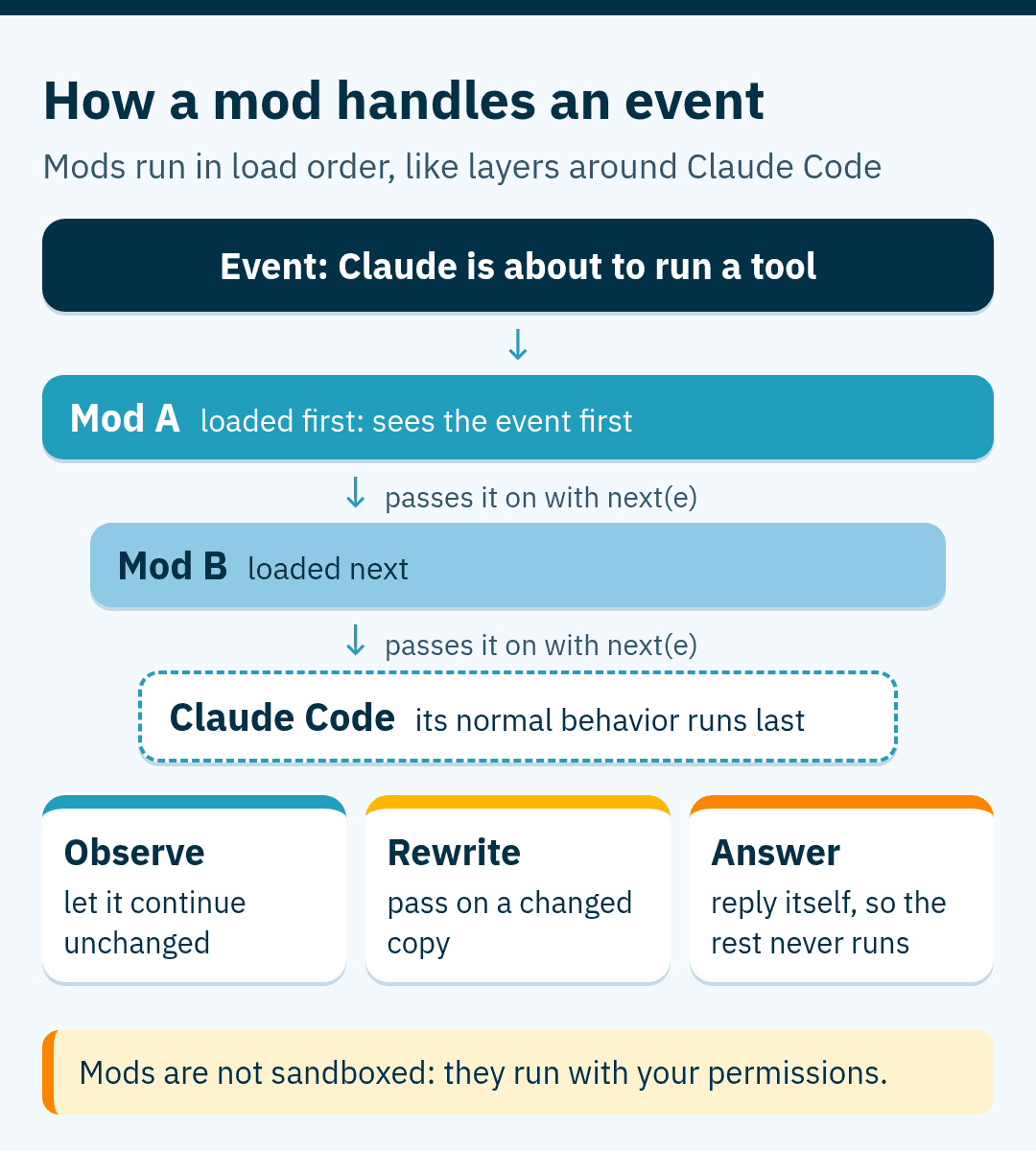
Every time Claude Code does something, it emits an event: Claude is about to call a tool, you submitted a prompt, a turn finished, or part of the screen is being drawn. A mod is a set of functions that Claude Code calls on these events. According to the official mods overview, each function can do one of three things with an event:
- Observe it and let it continue unchanged, for example to count tool calls.
- Rewrite it before it continues, for example to add text to the spinner or change a command.
- Answer it itself, so Claude Code's usual behavior never runs, for example to refuse a command.
When several mods hook the same event, they run in the order they load, like layers of middleware. Each one passes the event on with next(e), and Claude Code's own behavior sits at the bottom of the chain.
Some of Claude Code's own features are now mods too. The /diff pane, for example, is a built-in mod that you can switch off in /plugin or replace with your own. Anthropic publishes the source of several built-in mods in the claude-code repository.
One fact matters before anything else: mods are not sandboxed. A mod runs with your permissions, so it can read and write your files, start programs, make network requests, read your environment variables and call a model on your plan. Install mods only from people you trust.
Prompt, skill, hook or mod: which one do you need?
Claude Code already had several ways to customize it before mods arrived. People often describe a mod as "just a plugin". That is close, but a plugin is really the package: it can carry skills, settings hooks, MCP servers and mods together. Here is how the pieces compare, based on the docs for skills, hooks and mods.
Scroll horizontally to see all columns
| Tool | What it is | When it runs | Token cost |
|---|---|---|---|
| Prompt | An instruction you type in the chat | Once, when you send it | Its text enters the context and stays there |
| Skill | A SKILL.md file with reusable instructions | When your request matches it, or you call it | Its short description sits in context every turn; the full text loads only when it is used |
| Settings hook | A shell command, HTTP request, prompt or agent set in settings.json | On a lifecycle event, such as before a tool runs | A command hook costs no model tokens, but any text it adds to Claude's context does, and prompt or agent hooks call a model |
| Mod | JavaScript or TypeScript functions inside a plugin, loaded into Claude Code | On many events, all session long; it can also draw on screen | Watching events and drawing cost nothing; it spends tokens only when it calls a model, submits a prompt or adds text to the context |
| Plugin | A package with a manifest | Not a tool by itself | Depends on what it carries |
A good habit is to use the lightest tool that does the job. If you keep pasting the same instructions, write a skill. If a rule must always hold, such as blocking API keys before a push, a settings hook is enough. Reach for a mod when you need something the others cannot do: a live panel, your own question with custom buttons, memory across events, or a change to what Claude Code draws.
Who gets a mod: install scopes
A mod installs like any plugin, so it uses the same install scopes. There are three that you choose yourself, and a fourth that your organization controls:
- User scope: the plugin is on for you in every project on this computer. It is recorded in
~/.claude/settings.json. - Project scope: the plugin is on for everyone who works in the repository. It is recorded in
.claude/settings.json, which you commit. Each collaborator still installs the plugin on their own machine. - Local scope: the plugin is on for you, in this repository only, through
.claude/settings.local.json. - Managed: on Team and Enterprise plans, or on machines with managed settings, administrators can pre-install plugins, allow or block marketplaces, and stop user-installed mods.
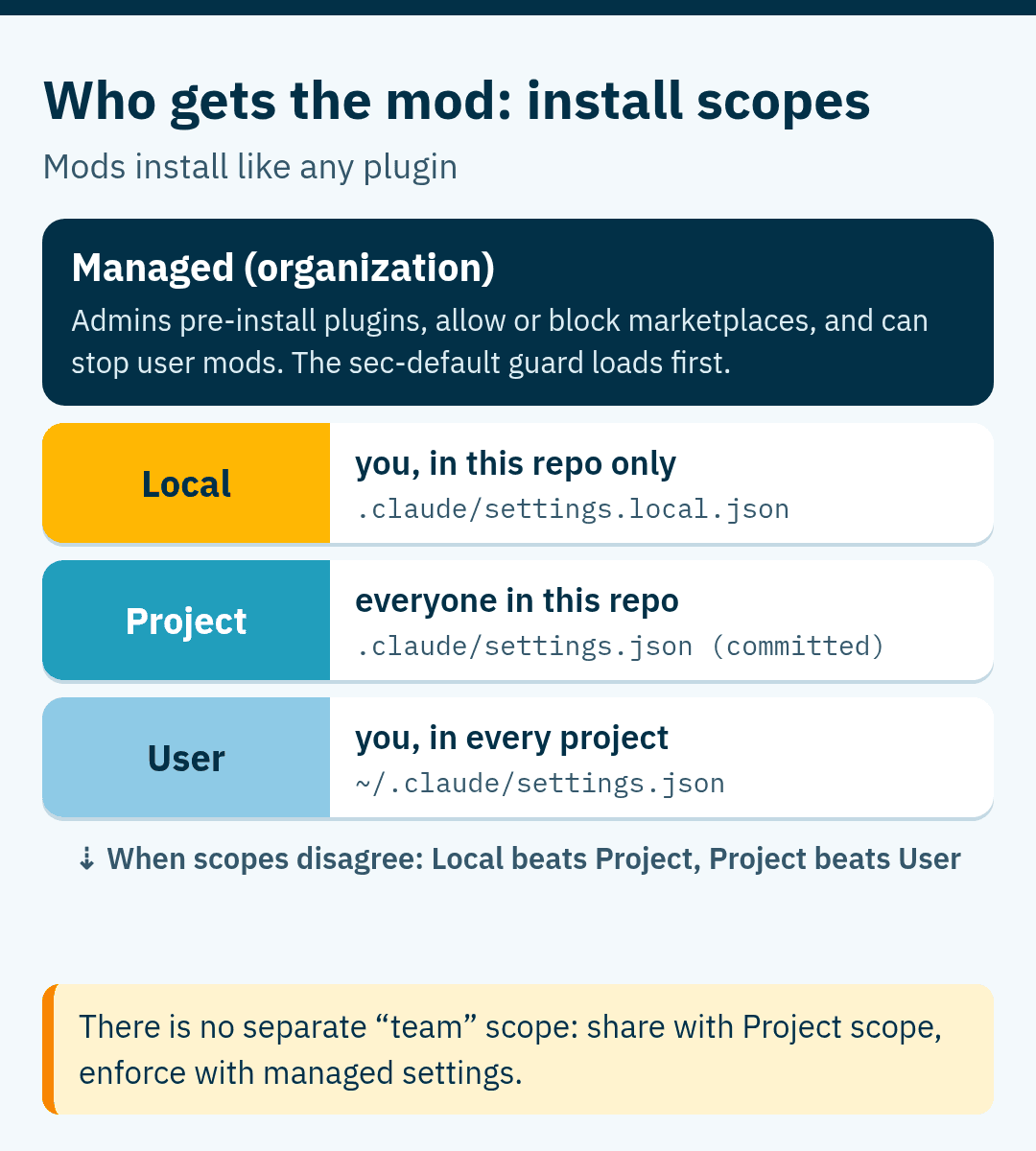
There is no separate "team" scope. Sharing with a team means project scope, while company-wide rules come through managed settings. On those managed machines and on Team and Enterprise plans, a built-in mod called sec-default loads first and stops user-installed mods from doing risky things, such as overriding your permission deny rules.
Example mods, grouped by the job they do
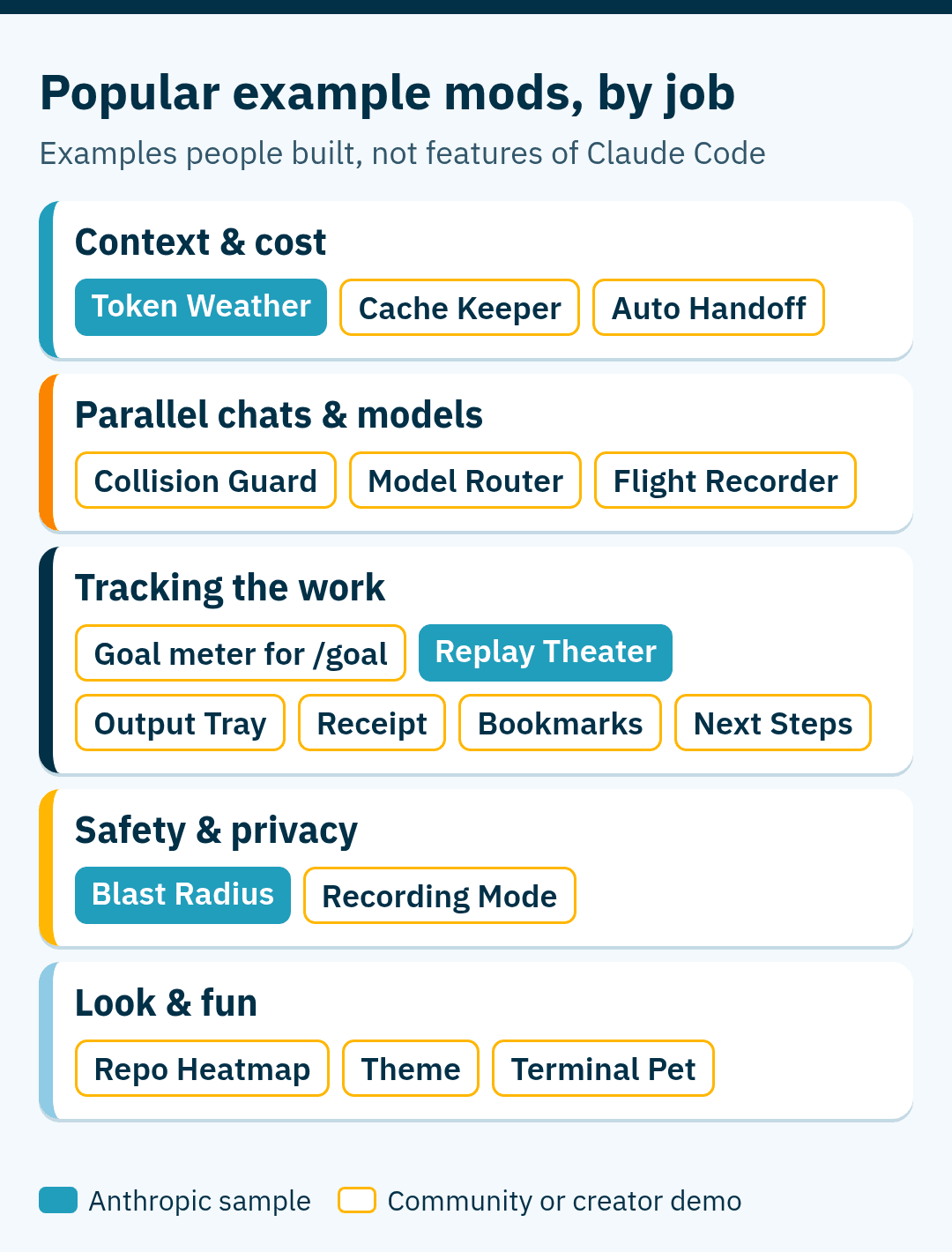
The mods below are the ones that circulated most in the first week. They are examples of what people have built, not a catalog of Claude Code features. They come from three places: three samples that Anthropic shares in its claude-code-playground repository (Token Weather, Blast Radius and Replay Theater), four mods that creator Nate Herk demonstrated in a video and published on GitHub under the MIT license, and a set of ten that Mark Kashef built in another video. Names, commands and behavior differ between authors, so read each project's README before you trust the details.
Context and cost
Token Weather, one of Anthropic's samples, draws a one-line "forecast" above the prompt: how full the context window is, plus a small chart of recent turns. Cache Keeper shows how long the prompt cache stays warm, what the next message would cost once it goes cold, and offers a handoff to a fresh chat. Auto Handoff watches context use and, at a threshold you set (85% in Kashef's demo), writes a summary and continues in a new session.
Parallel chats and models
Collision Guard asks before Claude edits a file that another open chat changed in the last 30 minutes. A model router sends exploration work to subagents on a cheaper model while the main model plans and summarizes. A flight recorder logs each turn: which model answered, which tools ran, which files were read or written, and how long each step took.
Tracking the work
A goal meter turns Claude Code's built-in /goal command into a progress view with phases, a checklist and a percentage. Other mods keep an output tray of files created in the session, a short receipt of changed files, or bookmarks with a one-line summary at key moments. Replay Theater, another Anthropic sample, adds a /replay command that steps through the edits Claude made in the last turn, one diff at a time. A next-steps mod, shown by Thariq Shihipar from the Claude Code team, offers suggested follow-up actions as buttons at the end of a turn.
Safety and privacy
Blast Radius, the third Anthropic sample, holds a risky shell command such as rm -rf or a force push, shows what it would change, and waits for Proceed or Cancel. Recording Mode masks API keys, emails and money amounts on screen while you record a video. Claude still works with the real values; only the display changes.
Look and fun
Some mods change the interface: a repository heatmap that shows where activity is concentrated, a color theme for the chat and footer described in plain language, or a small terminal pet that reacts to the files Claude reads. They are mostly harmless fun, but remember that every mod, even a pet, runs with your permissions.
Prompt caching: what the countdown really means
Cache mods are popular because caching has a real effect on cost and speed, but the numbers in many posts are oversimplified. Here is what the Claude Code caching docs and the API pricing table say:
- The cache has a time to live (TTL), and every request that hits the cache resets the timer.
- Claude Code uses a one-hour TTL for the main conversation only on a Claude subscription, within your plan's included usage. With an API key, a cloud provider or paid usage credits, the default is five minutes. You can choose either with the
promptCacheTtlsetting. - Subagents get their own cache, and it uses five minutes by default even on a subscription.
- Reading from the cache costs 0.1 times the normal input price on most models, which is the "90% discount" you hear about. It is even lower on some current models: 0.05 times on Claude Opus 5.5.
- Writing to the cache costs more than normal input: 1.25 times for the five-minute cache and 2 times for the one-hour cache.
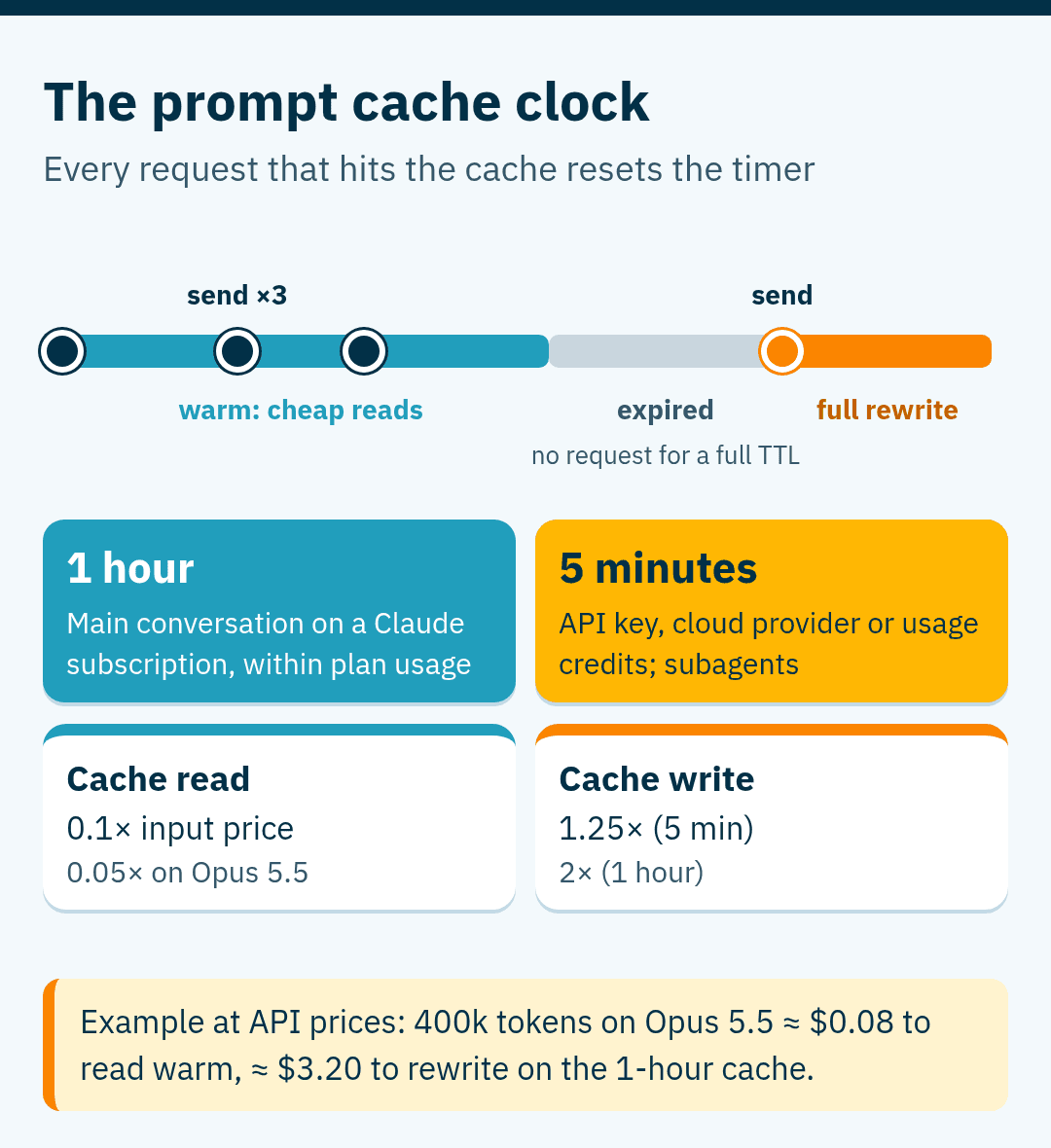
A worked example at API prices: a 400,000-token conversation on Claude Opus 5.5 ($4 per million input tokens) costs about $0.08 to read from a warm cache. If the cache has expired, the next message writes the whole conversation again, about $3.20 on the one-hour cache. On a subscription you do not pay per token, but the same work counts toward your usage limits.
You do not always need a mod to see this. Claude Code's status line already receives the context-window percentage, the 5-hour and 7-day usage limits, and whether the prompt cache is warm, so a short status line script can show a countdown with no mod at all.
Context size is a separate question. The current Claude Opus 5.5, Sonnet 5.5 and Fable 5.1 models run with a 1-million-token context window in Claude Code on the Anthropic API, while Claude Haiku 4.5 has 200,000 tokens. Very long contexts can make answers less focused, but there is no official token count where that starts, so treat claims like "quality drops after 400k tokens" as rules of thumb. Claude Code's own /compact and /clear commands remain the basic tools here.
Two flows worth understanding
Collision Guard is a good example of a mod doing something a settings hook cannot do well. According to its README, each open chat keeps a small log of the files it changed. Before an Edit, Write or NotebookEdit call, the mod checks the other chats' logs. If another chat changed the same file in the last 30 minutes, it asks you: proceed, move the work to a git worktree, or cancel. If you type your own answer instead, Claude receives it as the instruction.
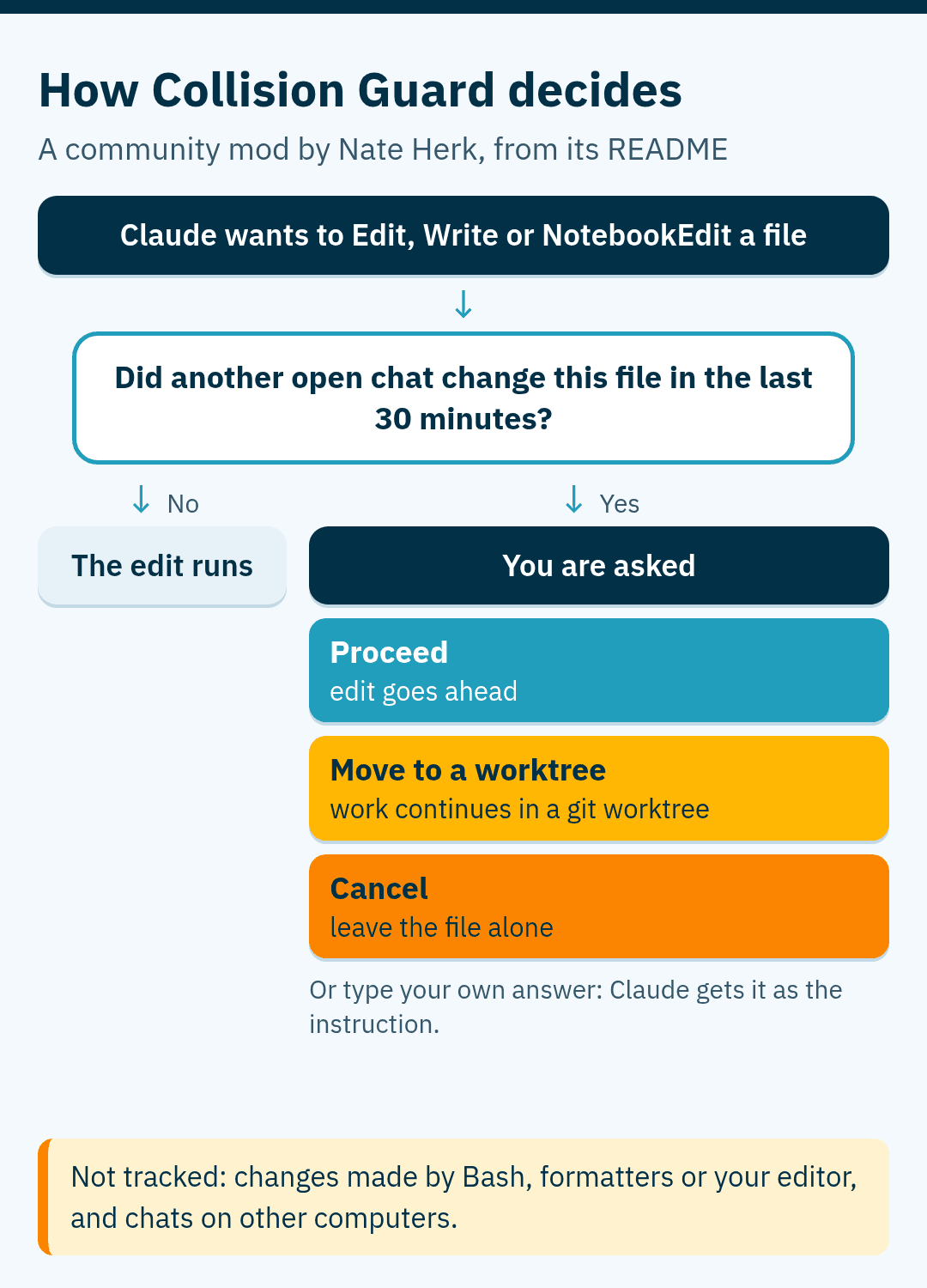
Know its limits: it only sees edits made through those three tools, so a file changed by a Bash command or by your own editor is not tracked. It also only sees chats on the same computer.
Model routing is the second pattern. You can already do part of it without a mod: a subagent can set model: haiku, and you can define your own Explore subagent that uses it. A mod goes further by deciding at runtime which model handles which request, or by showing the money saved.
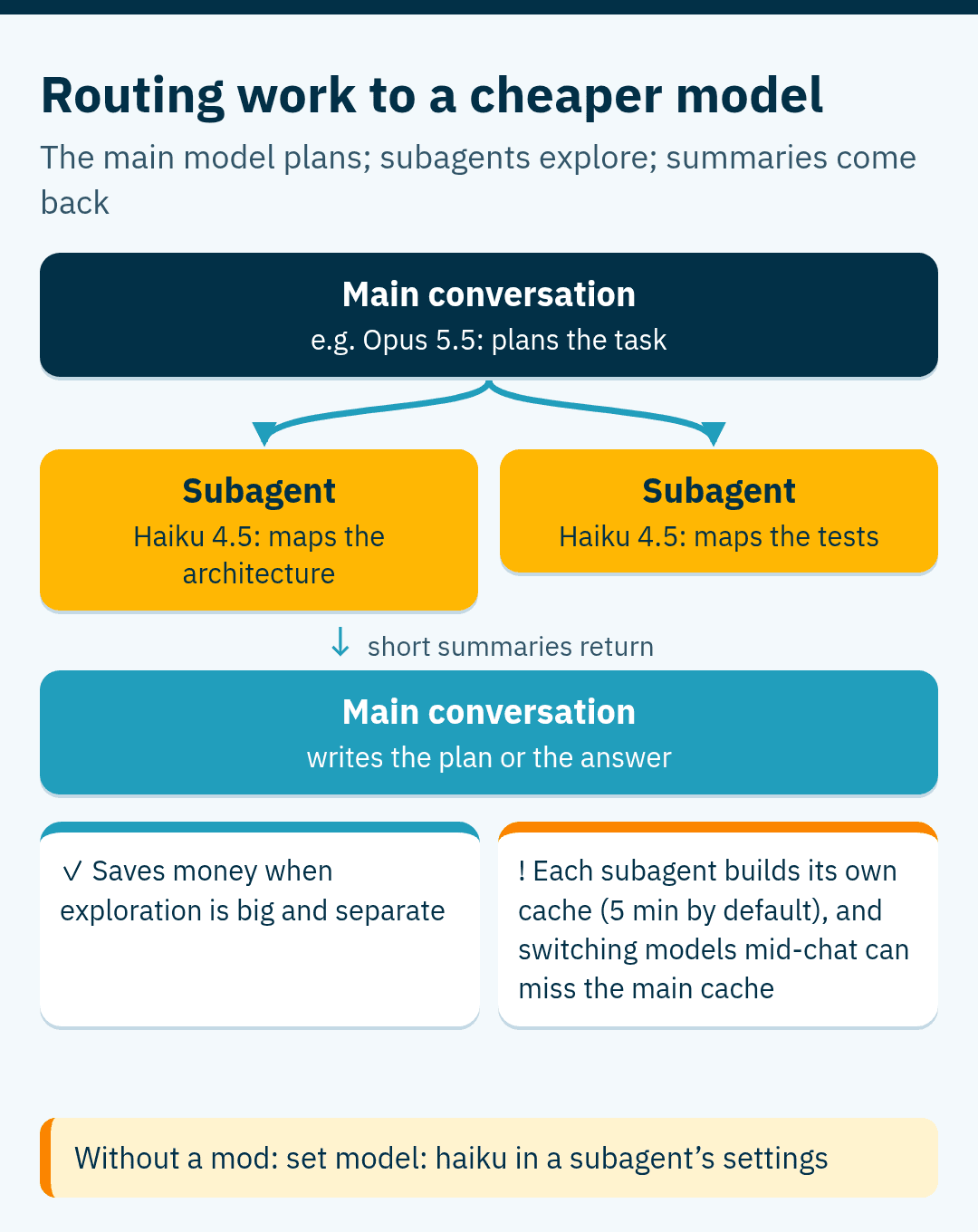
Routing is not free, though. Each subagent starts its own conversation and builds its own cache, and calling a different model from the main conversation can miss the main cache. A router saves money when the cheap work is large and separate from the main thread, and wastes it when it constantly switches models in the middle of a long session.
Build, install and remove a mod
The easiest way to build a mod is to ask Claude. Describe what you want in a Claude Code session, for example "make a mod that asks me before editing any file changed in the last 30 minutes". As the create a mod guide explains, Claude uses a built-in skill called plugin-authoring, writes the mod into a folder under ~/.claude/dev-mods/, and asks whether to enable hot reloading for the session. Once you allow it, the mod runs from the next turn.
Before you install a mod from someone else, list what it does without running it:
claude plugin validate ./some-modThe hooks: and calls: lines show which events it handles and what it asks Claude Code to do, such as reading files or making network requests. To install a mod, give the plugin name and its marketplace:
# inside a Claude Code session
/plugin install token-weather@claude-code-playground-mods

# or from your shell, choosing the scope
claude plugin install token-weather@claude-code-playground-mods --scope project
The marketplace name in these examples belongs to Anthropic's sample folder after you add a local clone of it as a marketplace; other mods name their own. If you install from the shell while a session is open, run /reload-plugins in that session. To try a mod for one session without installing it, start Claude Code with claude --plugin-dir ./path-to-mod.
To remove mods, you do not need to delete folders by hand. Uninstall a plugin with /plugin or claude plugin uninstall <name>@<marketplace>. To run one session with none of your mods, start Claude Code with --safe-mode. To stop every mod you installed, set "disableAllHooks": true in ~/.claude/settings.json, but note that this also stops your settings hooks and custom status line.
Rules of thumb for living with mods
- Install fewer mods than you think you need. Two mods that intercept the same event, such as two guards on file edits, run in load order and can make approvals confusing.
- Check what a mod calls before you install it, and check again after updates. A mod you trusted can change in a later version.
- Watch the mods that call a model. Drawing panels is free, but routers, supervisors and summaries spend tokens on your plan or API key.
- A guard that crashes or times out is skipped, so it fails open unless its author added a fallback. For hard rules, keep permission deny rules or a settings hook as well.
- For teams, put shared mods at project scope and set company rules through managed settings rather than relying on each developer.
Conclusion
Mods give Claude Code users a new kind of control: not just telling the agent what to do, but changing the tool around it. The feature is official and documented, while most of the mods you see online are community examples you can install, adapt or rebuild with one prompt. Start with a real annoyance in your own workflow, try the lightest tool first, read the code of anything you install, and keep the official docs at hand, because the mods API is new and will keep changing.
Related Articles
View all articles →
ComfyUI Explained: How Node Workflows Turn Local AI Image Generation into a Pipeline You Control
A practical guide to ComfyUI: why it uses nodes instead of fixed buttons, what hardware it really needs, how the basic text-to-image graph works, which KSampler settings matter, and how img2img, inpainting, LoRA and ControlNet plug in.

Getting Started with DeerFlow: Setup Wizard, Docker, and Practical Workflows
A practical guide to configuring DeerFlow, setting up model providers, running exact Docker commands, verifying startup, and executing document comparisons.

8 AI Coding Agent Tools for Verification, Efficiency, and UI
A technical guide to eight developer tools for coding agents, covering runtime verification, token reduction, 3D generation, UI skills, and linter rules.
Want this for your product?
Send a short note about your project. We will review it and explain the next useful step.
Contact Our Team